Part 4: Advanced usage
4.1 Choosing the right Language Model
UvA AI Chat gives you access to a range of advanced AI models (Large Language Models). The default, GPT-4o, is a strong all-rounder and works well for most tasks, but for specific needs, a different model may deliver better results. For simple tasks, you might prefer a smaller, more efficient model that uses less energy. To set up a different default model for your tasks, select the one best suited to your needs in the Settings menu like shown below.
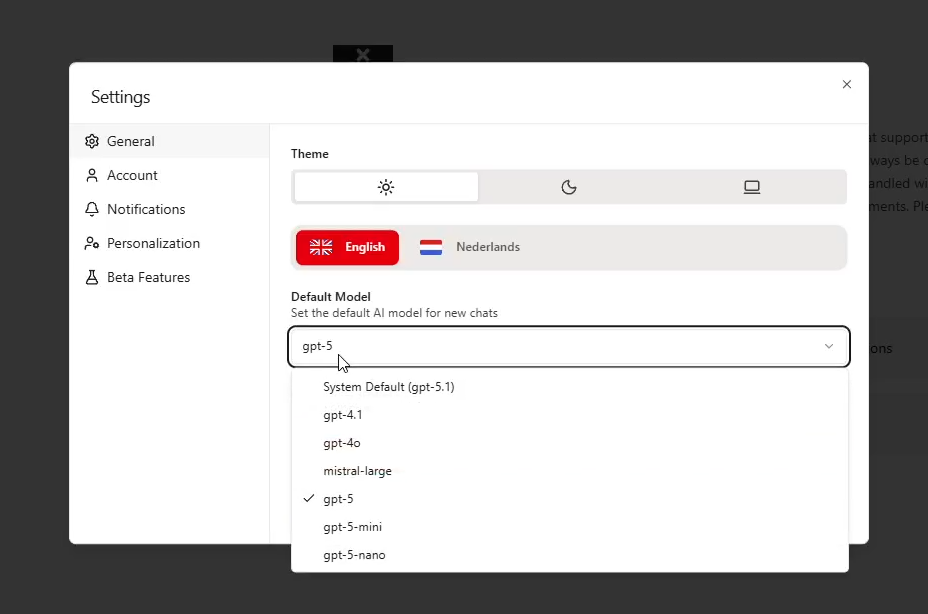
The table below is a quick reference to help you choose the most suitable AI model for your task. To find out which model works best for your needs, you'll need to experiment - especially if you're running recurring, specific tasks.
Comparison of available AI models
| Model | General Use Cases | Knowledge Cutoff | Energy / Cost (relative) | Type | Context Window Input | Context Window Output |
|---|---|---|---|---|---|---|
| gpt-5.1 (default) | Coding, complex reasoning, advanced analysis, building intelligent agents, high-quality academic or technical work | 30-09-2024 | High | Advanced reasoning model | 400K | 128K |
| claude-sonnet-4.6 | Complex analysis, coding, agentic workflows, creative work, long-context reasoning, knowledge work | 31-08-2025* | High | Hybrid reasoning model | 1M | 128K |
| gpt-5-mini | Brainstorming, concept clarification, study planning, working with text/images, faster everyday reasoning tasks | 31-05-2024 | Medium | Efficient reasoning model | 400K | 128K |
| gpt-5-nano | Very light tasks, short summaries, quick calculations, classification, routine assistant tasks | 31-05-2024 | Medium | Lightweight reasoning model | 400K | 128K |
| claude-haiku-4.5 | Quick tasks, summaries, document synthesis, routine operations, high-volume workflows, fast coding support | 31-07-2025 | Medium | Fast lightweight reasoning model | 200K | 64K |
| gpt-oss-120b | Open-source reasoning, coding, multi-step tasks, privacy-conscious or open-model workflows | 01-06-2024 | Low | Open-source reasoning model | 131K | 131K |
| mistral-small-3.2 | Quick responses, short explanations, lightweight assistant tasks, multilingual and multimodal use | 01-12-2023 | Low | Open-source / open-weight language model | 128K | 128K |
Legacy models
| Model | General Use Cases | Knowledge Cutoff | Energy / Cost (relative) | Type | Context Window Input | Context Window Output |
|---|---|---|---|---|---|---|
| gpt-4.1 | Code, large documents, long-context tasks, tool use, agentic planning, structured language tasks | 01-06-2024 | Medium | Advanced non-reasoning language model | 1M | 32,768 |
| gpt-4o | Visual content interpretation, diagrams/charts, presentation feedback, general multimodal tasks | 01-10-2023 | High | Multimodal model | 128K | 16,384 |
| gpt-5 | Complex projects, strategic analysis, advanced coding, deep reasoning, high-quality creative and academic work | 30-09-2024 | High | Advanced reasoning model | 400K | 128K |
4.2 Expanding functionality with extensions
Extensions are intended for technically savvy users who are familiar with APIs. They work as extra tools that the AI can use to handle tasks outside of the chat environment, such as retrieving information from external databases or carrying out actions in other software.
How it works
Extensions are powerful tools that give UvA AI Chat greater capabilities by allowing the AI to make API calls to internal or external systems. They act as extra tools that enable the AI to perform tasks outside of the chat environment, such as retrieving information from a database, carrying out actions in other software (like adding an item to a to-do list), or sending and receiving data. These tools are intended for technically savvy users who are familiar with APIs, as incorrect use can trigger unintended actions in external systems.
The process involves defining the extension's details and functions, and it utilizes the API structure described in the official OpenAI documentation (via openai.com). The creation interface is shown in the provided image.
To add your own extension, click "Add extension":
- Name: Give your extension a name in the "Name of your Extension" field.
- Short description: Write a brief description of the extension.
- Detail description: Provide a more detailed explanation of its specialties and the steps required to execute it.
- Headers: Define the necessary headers for the API calls. A default "Content-Type" header with the value "application/json" is shown. You can add more headers by clicking "Add Header." The platform also supports securing header values stored in Azure Key Vault.
- Functions: Add the specific functions that the extension will perform by clicking "Add Function." These functions can support various API requests, including GET, POST, and PUT, allowing the extension to both retrieve data and trigger actions.
- Submit: Once all the details are filled out, click the "Submit" button to finalize the creation of your extension.
Practical example of using an extension
A researcher configures an extension that communicates with the UvA library catalog API. Now they can use a prompt like:
"Use the library extension to find the five most recent publications by author 'Adriaan van Dis'. Provide the full APA citations for each publication and a direct link to each in the catalog."
4.3 Use the Web Scraper tool
Web Scraper function
UvA AI Chat has access to a web_scrape tool that lets it fetch and read the content of a webpage when you provide a URL. Here's how it works.
What it does
| Feature | Description |
|---|---|
| Input | A full URL (e.g., https://example.com) |
| Output | Page content in markdown format (markdown is a lightweight way to format text using simple symbols so it can be easily read and converted into nicely styled documents like web pages.) |
What UvA AI Chat can do with the Web Crawler
- Summarize the content of a webpage
- Extract specific information (e.g., dates, names, prices, policies)
- Answer questions based on the live content of a page
Limitations
- Only reads publicly accessible pages, no login-protected content
- Reads static content, dynamically loaded content (e.g., JavaScript-rendered pages) may not always be fully captured
- Does not browse the web autonomously, you need to provide the URL
- UvA AI Chat can only scrape one page per message
How to scrape a webpage:
To use this functionality, ask the UvA AI Chat to scrape a page for you and insert your page.
"Can you scrape this page and summarize it for me: https://example.com/article"
Simply paste a URL and tell UvA AI Chat what you'd like to know from it!
4.4 Writing Python code with UvA AI Chat
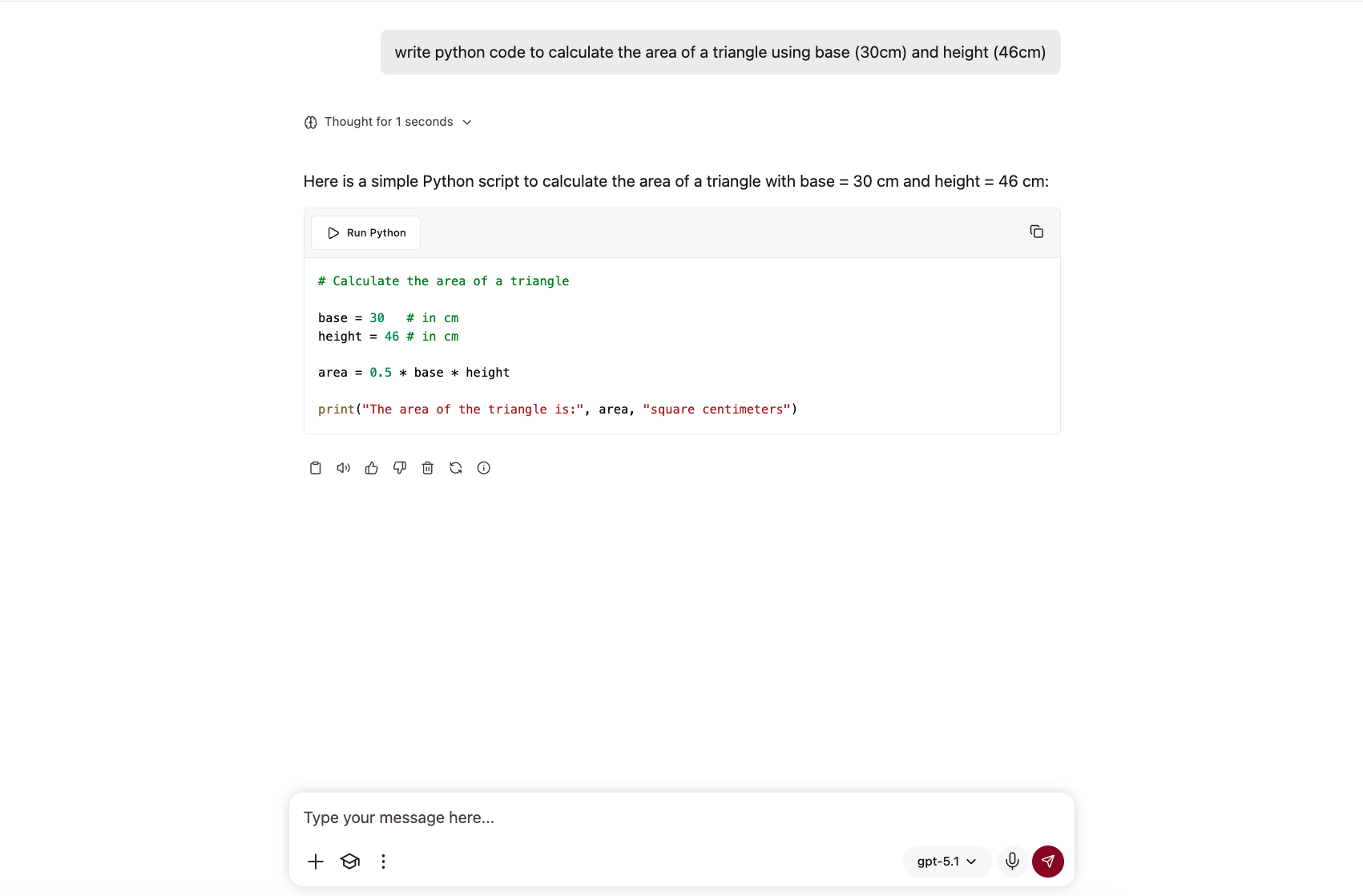
UvA AI chat can write and run Python code for you to analyse data, create charts, or perform calculations within a separate, safe environment. As per usual, your files stay private and separate from other users. When the AI generates graphs or images, they can appear directly in your conversation. Code is automatically shown in a separate panel where you can view, copy, or edit it. You can use the python functionality without knowing how to write python code, and you can analyse data, create charts, or perform calculations using python without knowing how to edit or write the code yourself. Is it important that the information extracted from the code is actually correct, for example, for education or research? Always check the data manually.
Using the code Once you ask for python code to be generated, a separate window is generated with the code. From here, you can run the code (by clicking Run Python) or copy all code lines (by clicking the two pages in the top right corner).
4.5 Viewing your estimated energy use in UvA AI Chat
UvA AI Chat includes a Usage dashboard where you can see an estimate of the energy associated with your AI use. This feature is meant to make the environmental impact of generative AI more visible and to support more mindful use of AI in study, teaching, research and work.
The numbers in this dashboard should be read as estimates, not as exact measurements. The actual environmental impact of an AI interaction depends on many factors, including the model used, the amount of text processed, the data centre infrastructure, hardware efficiency and the energy mix behind that infrastructure. The dashboard therefore gives an indication of energy use, rather than a precise real-time calculation.
Why this matters
Generative AI systems require computing power, and computing power uses energy. At the same time, it is not always easy to see how much processing happens behind a single AI interaction. A short answer may require less computation than a long conversation with uploaded files, extensive context or repeated follow-up prompts.
By showing estimated energy use and token use, UvA AI Chat helps users reflect on their own AI use. The purpose is not to discourage the use of AI, but to encourage deliberate and efficient use: using AI when it adds value, while avoiding unnecessary processing where possible.
This fits a broader sustainability perspective: responsible AI use is not only about whether you use AI, but also about how you use it.
How to find your usage overview
To view your estimated energy use:
- Open UvA AI Chat.
- Click your profile/account icon in the bottom-left corner.
- Select Settings.
- In the Settings menu, click Usage.
- You will see your estimated energy use, token use and model mix.
You can use the dropdown menu at the top of the Usage page to select a period, such as Last Hour or Last week.
What the Usage dashboard shows
The dashboard contains three main types of information: estimated energy use, used tokens and model mix.
-
Estimated energy use
The dashboard shows an estimated amount of energy for the selected period, expressed in Wh: watt-hours. It may also translate this into a more familiar comparison, such as a percentage of a phone charge.This comparison is meant to make the number easier to interpret. It should not be read as an exact environmental footprint, but as a practical way to understand scale.
-
Used tokens
The dashboard also shows how many tokens you have used. A token is a small unit of text. As a rough indication:1 token ≈ 3/4 of a word
Token use includes the text you enter and the text generated by the AI. In some situations, it may also include additional context that the model needs to process, such as previous messages, uploaded files, project information or instructions.
In general, more tokens means more computation. Longer conversations, large documents, repeated prompting and very detailed outputs can therefore increase estimated energy use.
-
Model mix
The Model mix section shows which models you used during the selected period and what percentage of your usage each model represents.This matters because different models may require different amounts of computing power. More advanced models can be useful for complex tasks, but they are not always necessary for simple ones. Choosing a suitable model for the task can help make AI use more efficient.
How the estimate works
The Usage dashboard estimates energy use based on token use and assumptions about the energy cost of processing those tokens. It also uses an assumed input/output ratio and refers to published research as the basis for these calculations.
Because AI systems are complex and the exact energy use of a single interaction is difficult to determine, the dashboard should be understood as a rough but useful indicator. It is best used for awareness, comparison and reflection over time.
Using AI more efficiently
The Usage dashboard can help you make small, practical choices in how you use AI. For example:
- Write clear prompts so you need fewer repeated corrections.
- Avoid sending unnecessary long context or large files.
- Summarise long conversations before continuing, instead of carrying all previous context forward.
- Use advanced models when the task requires them, but choose lighter or more suitable options for simpler tasks where possible.
- Ask for focused outputs instead of unnecessarily long responses.
The main principle is: use AI when it meaningfully supports your goal, and use it as efficiently as possible. The Usage dashboard helps make that process more visible.
4.6 Documents and files UvA AI Chat can generate
UvA AI Chat can help you create different types of downloadable documents and files. This is useful when you want to turn a conversation into a reusable text, a simple webpage, a code file, a data file, or a diagram.
How to ask for a file
You do not need to know all file extensions by heart. You can describe the type of output you need in plain language. For example:
“Make this into a downloadable markdown file.”
“Create a CSV table from this information.”
“Generate a simple HTML page with this content.”
“Write a Python script that analyses this data.”
“Make a Mermaid flowchart of these steps.”
For best results, mention:
- what the file should contain;
- which format you want;
- whether it should be simple or styled;
- and whether it is meant for reading, editing, publishing, analysis, or reuse.
As of now, UvA AI Chat can not edit existing files, only generate new ones.
Good to know
Some generated files are mainly meant for reading, such as .txt, .md, .html or .pdf. Others are meant to be opened or edited in specific tools, such as .csv in a spreadsheet program, .py in a code editor, or .mmd in a Mermaid-compatible viewer.
For code files, UvA AI Chat can generate many different programming languages. Whether the code can also be run directly depends on the available runtime environment and the libraries or tools that are supported there. Always check generated code before using it, especially in education, research, data analysis, or production environments.
To edit in pictures, upload your own from a local source. While creating your file, UvA AI Chat is unable to fetch pictures from the internet.
Every supported file type
| Category | File type | Extension(s) |
|---|---|---|
| Documents and text | Plain text | .txt |
| Documents and text | Markdown | .md |
| Documents and text | HTML | .html |
| Generated code artifacts | JavaScript / TypeScript | .js, .ts, .tsx |
| Generated code artifacts | Python | .py |
| Generated code artifacts | Java | .java |
| Generated code artifacts | C / C++ / C# | .c, .cpp, .cs |
| Generated code artifacts | PHP | .php |
| Generated code artifacts | Ruby | .rb |
| Generated code artifacts | Go | .go |
| Generated code artifacts | Rust | .rs |
| Generated code artifacts | Swift | .swift |
| Generated code artifacts | Kotlin | .kt |
| Generated code artifacts | Scala | .scala |
| Generated code artifacts | R | .r |
| Generated code artifacts | MATLAB | .m |
| Generated code artifacts | Lua | .lua |
| Generated code artifacts | Perl / Prolog | .pl |
| Generated code artifacts | Haskell | .hs |
| Generated code artifacts | Clojure | .clj |
| Generated code artifacts | Dart | .dart |
| Generated code artifacts | Elixir | .ex |
| Generated code artifacts | Erlang | .erl |
| Generated code artifacts | F# | .fs |
| Generated code artifacts | Groovy | .groovy |
| Generated code artifacts | Julia | .jl |
| Generated code artifacts | Nim | .nim |
| Generated code artifacts | OCaml | .ml |
| Generated code artifacts | Pascal | .pas |
| Generated code artifacts | Racket | .rkt |
| Generated code artifacts | Scheme | .scm |
| Generated code artifacts | Visual Basic | .vb |
| Generated code artifacts | Assembly | .asm |
| Generated code artifacts | Fortran | .f90 |
| Generated code artifacts | COBOL | .cob |
| Generated code artifacts | Ada | .ada |
| Web and data files | HTML | .html |
| Web and data files | CSS / Sass / Less | .css, .scss, .sass, .less |
| Web and data files | JSON | .json |
| Web and data files | XML | .xml |
| Web and data files | YAML | .yml |
| Web and data files | SQL | .sql |
| Diagrams | Mermaid | .mmd |
| Chat export downloads | Plain text | .txt |
| Chat export downloads | CSV | .csv |
| Chat export downloads | .pdf |